
Run your estate's billing, payments and gate in one place.
WHARI gives your estate team a web admin for residents, service charges, collections, visitors, electricity and reports, and gives your residents an app to pay, buy power and invite guests.
Live in an estate? Pay your dues, buy electricity and invite visitors from the WHARI app, and pay airtime, data and TV bills even if your estate isn't on WHARI yet.
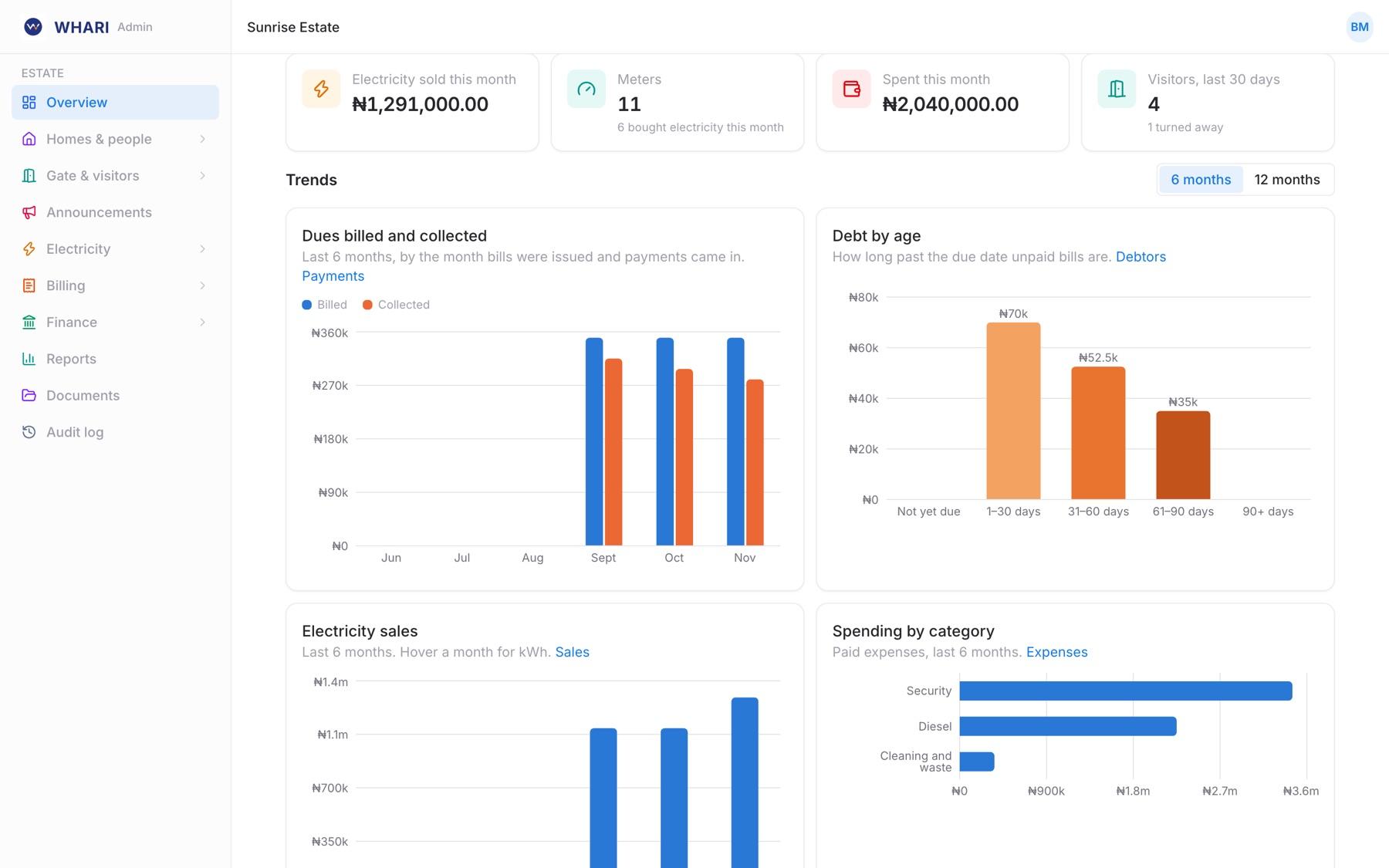
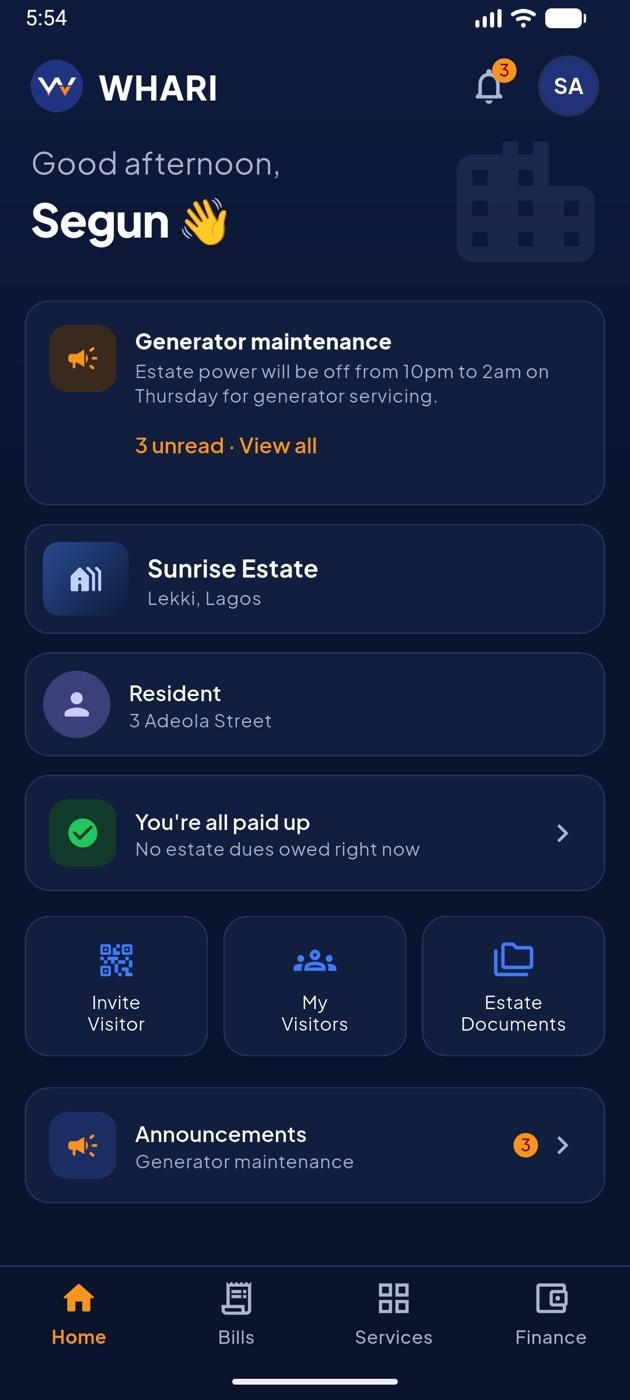
Web admin for estates
For admins, finance officers, facility managers and gate staff.
Resident app
For iOS and Android, coming soon to the app stores.
Automatic payouts
Money collected through WHARI is paid out to the estate's bank account.
Estate management
Everything the estate office keeps track of
Replace the spreadsheets, receipt books and WhatsApp threads with one web admin your whole team works from.
Homes and people
Registers for homes, residents, owners and landlords, and property managers. Bring existing records in from a spreadsheet.
Staff roles and permissions
Give admins, finance officers, facility managers and gate staff access to the parts of WHARI they need.
Estate billing
Set up fees such as service charge and levies, run billing, and issue invoices, receipts and statements.
Debtors and debt ageing
See who owes what and for how long, so follow-up starts with the right homes.
Expenses with receipts
Record estate spending and attach the receipt to each expense.
Announcements
Send notices to residents and have them land in the WHARI app.
Estate documents
Share bylaws, meeting minutes and notices with residents in one place.
Audit log
Every change is recorded, so you can always see who did what and when.
Payments & wallet
Collect dues without chasing transfers
Residents pay their estate dues in the app, and the money collected is paid out to the estate's bank account automatically.
For the estate
- Payments for estate dues are collected through WHARI
- Collections are paid out to the estate's bank account automatically
- Receipts and statements are issued from the same records
- Collections and billing-by-fee reports show what came in
For residents
- See what you owe the estate and pay it from the app
- A WHARI wallet you can fund by card or bank transfer
- Every payment confirmed with your transaction PIN or Face ID / fingerprint
- Use the same wallet for electricity, airtime, data and TV
Electricity
Prepaid electricity, whichever way your estate is set up
Whether the estate runs its own metering or residents buy from the DisCo, residents buy tokens in the WHARI app and the estate can see the sales.
Estate-managed
Prepaid vending for estate meters
- The estate sets the tariff
- Set a monthly minimum and first-purchase charges
- Residents buy tokens for their estate meter in the app
- Electricity sales and the meter register in your reports
DisCo tariff
DisCo prepaid tokens for each home
- Residents buy DisCo prepaid tokens at the DisCo price
- Each home's meter is saved for quick top-ups
- The estate sees the electricity sales made through WHARI
Bills for everyone
Everyday bills, no estate needed
Anyone can download WHARI to pay airtime, data, TV and DisCo electricity bills for themselves, family or friends.
- Pay for any number or meter, not just your own
- Saved numbers and recents for quick repeat payments
- Pay from your WHARI wallet, confirmed with your PIN or Face ID / fingerprint
Look out for promotions in the app from time to time.
Visitors & security
Know who came through the gate
Swap the paper visitor book for visitor passes, gate check-in and a gate log the estate can review.
Resident invites
A resident creates a visitor pass from the app.
Gate checks in
Gate staff check the visitor in against the pass.
Gate log
Every check-in is recorded in the gate log.
Visitor reports and an audit log. Review visitor activity in your reports, and every change made in the admin is kept in the audit log.
Reports & dashboards
Clear numbers for the committee meeting
Dashboards with charts give the estate a quick read on where things stand. Paged reports go deeper, and each one exports to CSV.
How it works
Getting your estate started
- 1
Request a demo
Tell us about your estate and we'll walk you through WHARI.
- 2
Set up your estate
Import homes, residents, owners and landlords from a spreadsheet, and add your staff with the right roles.
- 3
Configure fees and electricity
Add your service charge and levies, the bank account for payouts, and your electricity setup.
- 4
Invite your residents
Residents join on the WHARI app to pay dues, buy electricity, invite visitors and read notices.
Who it's for
Built for everyone in the estate
Estate admins and finance officers
Keep the registers, run billing and see what has been collected.
- Billing runs, invoices and receipts
- Debtors with debt ageing
- Expenses, reports and CSV export
Facility managers and gate staff
Look after the day-to-day running of the estate.
- Visitor passes and gate check-in
- Announcements and estate documents
- Electricity sales and meter register
Residents
Handle estate life and everyday bills from one app.
- Pay estate dues and buy electricity
- Invite visitors, read notices
- Airtime, data and TV from the wallet
FAQ
Questions, answered
What is WHARI?
WHARI is an estate management and everyday payments platform for Nigerian estates, gated communities and their residents. Estates use a web admin; residents use the WHARI mobile app for iOS and Android.
Who is behind WHARI?
WHARI is a product of El'blaze Technologies Limited.
How does the estate receive the money residents pay?
Payments are collected through WHARI and paid out to the estate's bank account automatically.
Can we bring in our existing records?
Yes. Homes, residents, owners and landlords, and property managers can be imported from a spreadsheet.
How does electricity work on WHARI?
Two ways. If the estate manages its own prepaid metering, the estate sets the tariff, a monthly minimum and first-purchase charges, and residents buy tokens for their estate meter in the app. If the estate is on the DisCo tariff, residents buy DisCo prepaid tokens at the DisCo price and save their home meter, and the estate sees those sales.
Can I use WHARI if my estate isn't on it?
Yes. Anyone can use the app to pay airtime, data, TV and DisCo electricity bills, with no estate needed.
How are resident payments protected?
Every payment is confirmed with the resident's transaction PIN or with Face ID / fingerprint.
Can we export our reports?
Yes. Reports for collections, billing by fee, expenses, visitors, electricity sales and the meter register can be exported to CSV.
Where can I download the app?
The WHARI app for iOS and Android is coming soon to the App Store and Google Play.
See WHARI with your estate in mind
Request a demo and we'll show you billing, payments, electricity and the gate, set up the way your estate works.
Request a demo
Let's talk about your estate
Tell us a little about your estate and we'll get in touch to arrange a walkthrough of WHARI.